What WhatsApp usernames are, how to reserve yours step by step, and how to use them to protect your number.

A username is a unique identifier tied to your personal account. Instead of sharing your number, you will be able to give out a name like @LauraMTravels.
It is not the same as your profile display name. It is not a password either, and it does not replace the number you registered the account with. Your phone number will still be required to manage and verify WhatsApp, but the username will offer a new way to start contact.
WhatsApp stated there will be no public directory or profile suggestions. To message someone for the first time you will need to know their exact username. Each user will also be able to enable an optional key to better control who can contact them.
The feature is rolling out progressively, so it may arrive at different times for each account.
Meta announced it would first allow reserving names before enabling general use, and that it will notify users inside WhatsApp when the feature becomes available in each country.
If you still cannot find the “Username” option, it does not mean something is wrong with your account. Keep the app updated and avoid installing unofficial versions to try to activate it early.
Before you start, make sure you are using the latest version of WhatsApp.
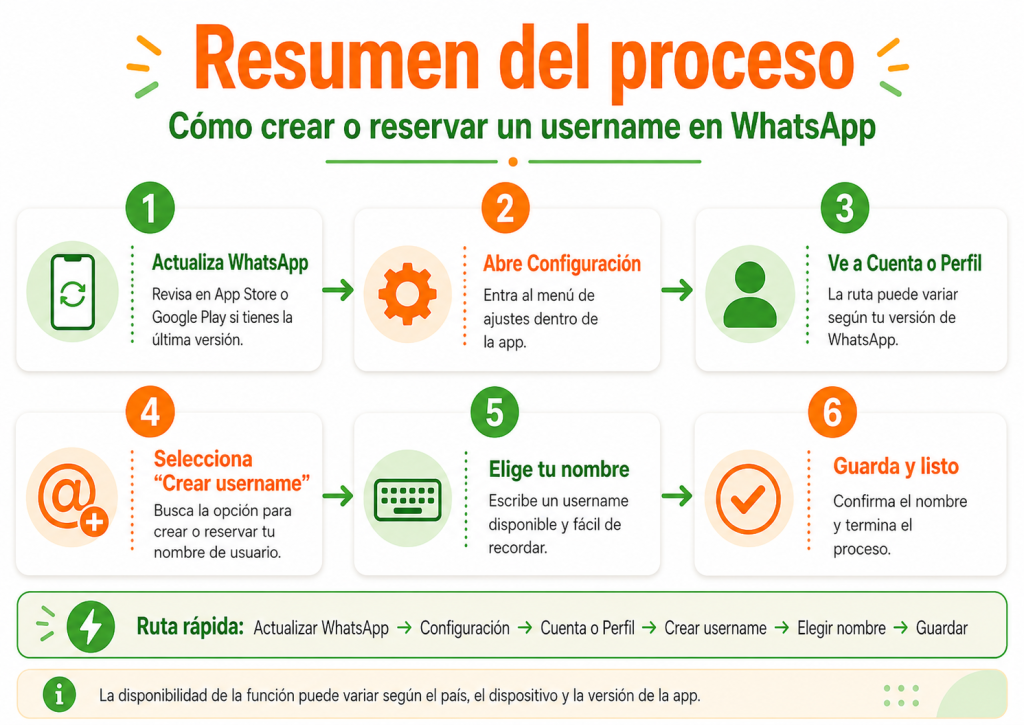
Open Google Play on Android or the App Store on iPhone and check for a pending update.
Updating the app is necessary, but it does not guarantee the username option will appear immediately. Availability also depends on the rollout for each country and account.
On Android, open WhatsApp, tap the three-dot menu and select Settings.
On iPhone, open the app and tap Settings at the bottom of the screen.
The official path announced by WhatsApp for the reservation is:
Settings → Account → Username
Depending on your operating system or app version, the option may also appear in your profile area. Its name and location could change slightly during the rollout.
Tap the option to create or reserve a username and type the name you want to use.
WhatsApp will check whether the identifier meets its rules and whether someone else has already reserved it. If it is not available, you will need to try a variation.
For example, if @LauraMartinez is taken, you could try:
When WhatsApp confirms the name is available, tap Save and then Done.
The username will be created or reserved for your account. If the full feature is not yet active in your country, you will be able to use it once WhatsApp enables contact via usernames.
The name should be easy to remember, type and share. At the same time, avoid details that could reduce your privacy.
Do not include your phone number, address, personal documents or date of birth. For example, @LauraMartinez15081992 could reveal a full name and an important date. An alternative like @LauraMTravels is shorter and exposes less information.
Also check the spelling. Names with very similar letters or numbers can make confusion or impersonation attempts easier.
Using the same username across your networks can help you keep a recognizable identity — but it also makes it easier to link your profiles. The choice depends on the balance between recognition and privacy.
WhatsApp will let you manage your username from the account settings. Go to Settings, open the Username section and select the option to edit or delete it. To change it, you will need to pick another available identifier. Keep in mind that people who knew the previous name may no longer find you through that username.
You will also be able to delete it without deleting your account. Since recovery conditions may change during the launch, review the information shown in the app before confirming.
No. The number will still be required to register and manage the account.
What changes is how conversations with new contacts begin. Once usernames are enabled and you have one active, someone will be able to message you without you having to share your phone number first.
Anyone who already knows or saved your number will keep that information. The feature is mainly designed for new contacts.
Usernames give you more control over who can see your number, but they do not remove every risk.
Confirm the other person's identity when necessary. Do not send money just because a username looks familiar, and watch for variations in letters, dots or numbers.
Never share codes received by SMS, your two-step verification PIN or sensitive information. If you receive suspicious messages, use the block and report options.
Usernames are a major change in how conversations start on WhatsApp. Once the option is available, creating or reserving one will take just a few steps and will let you share a contact method without immediately handing over your phone number.
Choose an identifier that is easy to remember and does not reveal sensitive information, and consider enabling the optional key to better control who can message you. Remember: the username does not replace your phone number or your usual security practices — it is a new tool to manage your privacy.
The feature is being enabled gradually depending on country, account, device and WhatsApp version. Keep the app updated and wait for the official in-app notification.
No. The number is still required to register and manage the account. The username lets you start new conversations without initially sharing your number.
Yes. WhatsApp will let you edit or delete the username from your account settings. If you choose a new one, it must be available and not reserved by someone else.